Automatic detection
V3 can automatically identify compatible devices. The detection and connection capabilities depend on the model and interface.
Check the model
Cash registers, bank POS terminals and weighing scales, connected via FiscalNET. A current interface for configuring and monitoring compatible equipment.
V3 can automatically identify compatible devices. The detection and connection capabilities depend on the model and interface.
Check the modelManage multiple cash registers from the same application and monitor the status of each connection.
View featuresFiscalNET PLUS transmits the amount to the compatible bank POS via the integration configured for the device. The availability of the function is checked for the platform and terminal in use.
Connect the POSConnecting the scales requires FiscalNET PLUS. Check the model, interface and protocol supported by your configuration.
Guide for weighing scales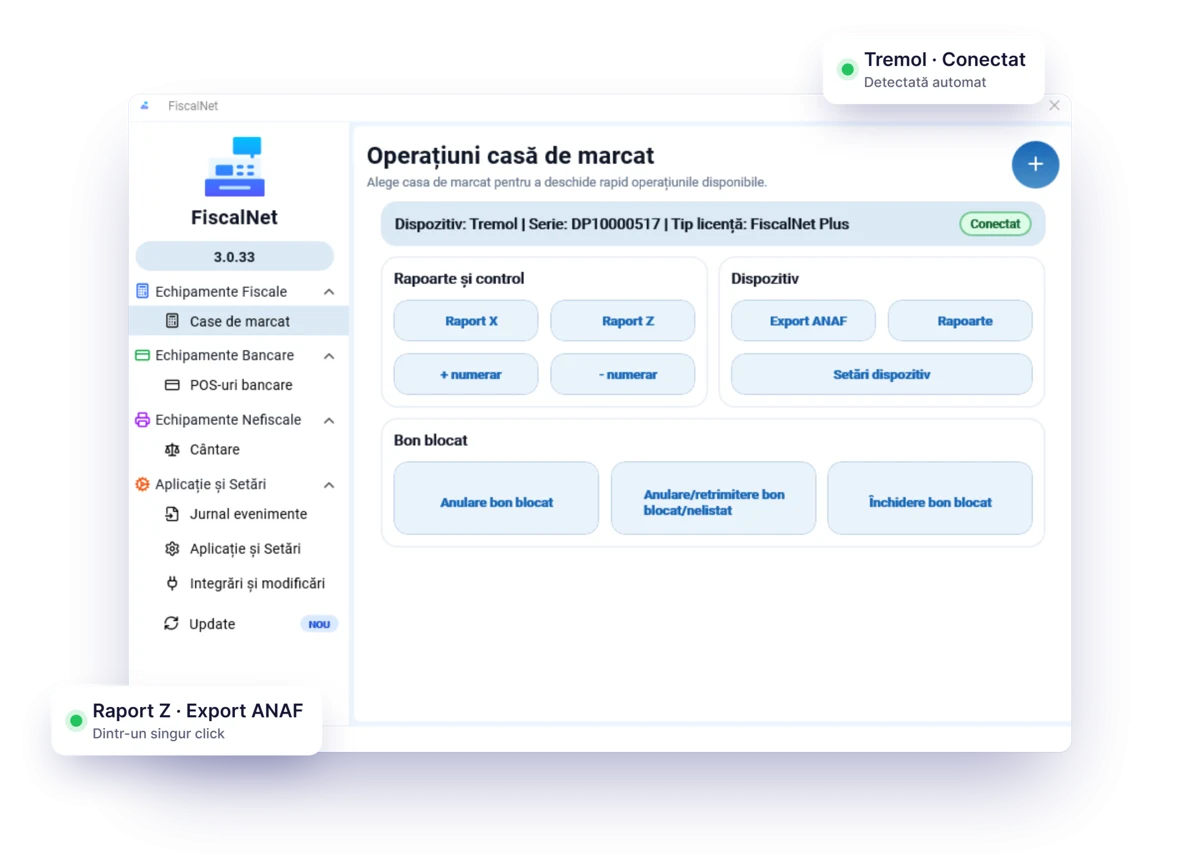
Each piece of equipment is listed separately, with information about the connection and the licence. Select the device before opening the available operations.
| Do you need to… | In FiscalNET V3 |
|---|---|
| You monitor the equipment | View the connection status and manage the devices from the same interface. |
| Access the reports | You open Report X, Report Z, ANAF Export, reports from the electronic journal (JE) and the report from the fiscal memory (MF), depending on the connected equipment. |
| You manage the cash | You can access cash deposits and withdrawals, depending on the connected model. |
| You identify a problem | Check the device status and the event log. The messages available depend on the equipment. |
The screenshot shows the Windows version. Menus and functions may differ between platforms, models and licences.
FiscalNET V3 is available for Windows and Android. For Windows: Windows 10, minimum version 1809 / build 17763, or Windows 11. For Android, check the app requirements for your device on Google Play.
Connections can use COM, USB, network or Bluetooth, depending on the equipment. For older Windows configurations, V2 is available separately on the downloads page.
Note the model, interface and parameters used, and retain the current configuration before making any changes.
Install the correct version, connect the device, and check the detection or configuration required for the model.
Test the integration with the software used, the receipt directory or the API transport, and the interpretation of responses.
For included remote consultancy and technical support, choose an annual or PLUS licence. The Perpetual Licence allows for requests by email, without these services being included.
For developers: general integration guide describes the files, HTTP, Android Intent, INP and the interpretation of responses.
Yes. FiscalNET V3 allows you to manage multiple compatible devices from the same application. In the integration, select the appropriate device and check the licence associated with its serial number.
Automatic detection can simplify installation, but the possibilities vary depending on the model and interface. If the device is not identified, follow the model sheet and check the connection parameters.
Check the version and integration method used with the application provider. On Windows, there is integration via files; the HTTP API is documented for Windows and Android. Also confirm the interpretation of the response before use.
V3 is available on both platforms, but the functions should not be assumed to be identical. Bank POS integration via API is available on Windows and requires FiscalNET PLUS and a compatible terminal.
The API documentation and the general guide describe commands, transport and responses. To execute commands via the API, use the documented POST method; a transport response alone does not confirm the issuance of the receipt.
API Documentation · Installation Guide · About the FiscalNET team and product
Commands, transport and conventions for your application.
View the documentationCompare the options and services included.
Choose the licenceSend to suport@fiscalnet.ro FiscalNET version, equipment model, connection type and the exact message displayed.
Download FiscalNet and configure your equipment.